Home Blog Page 3

15 Best Co-Op Puzzle Games on Steam: Gaming Together

Enjoying a well-designed puzzle game with a friend can be both mentally stimulating and enjoyable. This genre of video games will continually challenge your patience, problem-solving skills, and teamwork. With Steam’s vast amount of game options, it can be hard to know which games are the top choices. In this article, we will go over the best co-op puzzle games on Steam to fit your needs!

Table of Contents

Best Paid Co-op Puzzle Games on Steam

Many of the best co-op puzzle games on Steam are ones that you need to purchase. These game titles are highly rated by the puzzle lovers of the gaming community for being both challenging and high in quality. You can expect these top-level puzzle games to require cooperation, teamwork, and communication to be successful. The following games are our top picks for paid puzzle games that are worth every penny.

Portal 2

Portal 2 is a long-standing and beloved classic co-op game within the gaming community. This game set the bar high for other puzzle games when it was released. If you are searching for a puzzle game that emphasizes teamwork and cooperation, this is a must-play. Portal 2 has both single-player and co-op campaigns that provide you with two very different and unique experiences, so they are both worth playing if you love puzzle games. Co-op mode will provide you with six levels, each having 6-9 test chambers to play through. Additionally, since Portal 2 is such a well-known and loved game, the community-designed levels are extensive. This game has a whole lot of content to keep you and a friend busy for many hours.

Check out Portal 2 on Steam!

It Takes Two

It Takes Two has gained popularity as a must-play game for couples to play, although it’s an excellent game to play with friends as well. The storyline is centered around a husband and wife who are on the verge of divorce. The daughter of the couple ends up crying while wishing for them to stay together, unknowingly unleashing a magic spell that turns them into dolls. The two characters must learn to collaborate and fix their broken relationship to return to their human forms again. It Takes Two is played in a split screen format because it is essential to see the view of the other person to successfully solve the levels. It is a very unique game with beautiful graphics and a heartfelt story that will keep you captivated for hours.

Check out It Takes Two on Steam!

Human Fall Flat

Human Fall Flat is an excellent game that provides a heavy dose of humor and quirkiness within a challenging puzzle game. There is no doubt that this award-winning game is one of the best co-op puzzle games on Steam. You must solve each map by working through the many puzzles within each level by climbing, jumping, carrying and using items, and so much more. All of which is a challenge due to the physics and difficult movements of the game. Human Fall Flat can be played solo or with up to 8 other people. It features 25 fun and wacky maps with more content being regularly added. Human Fall Flat will test your coordination and problem-solving skills at the same time.

Check out Human Fall Flat on Steam!

Operation: Tango

Operation: Tango is an online co-op only spy game that puts the weight of saving the world on your shoulders. In this game, you work together with one other person as either an agent or a hacker while you complete different missions to bring down a tech company that is threatening the world. Both people will be working on different tasks while having to communicate what they know. There will be a heavy emphasis on the ability to verbally convey details and information to another person. This is an excellent cooperative game for fans of puzzle games who want to try something a bit different. Due to the similarities, it may come as no surprise to you that this game is made by the makers of Keep Talking and Nobody Explodes!

Note: As long as one player owns this game, the other person can play it for free!

Check out Operation: Tango on Steam!

A Way Out

A Way Out is made by the same developer who made It Takes Two, so if you like one then you will probably enjoy the other! The game works similarly as It Takes Two. You will be working with one other person in a split-screen style format, where you will need to be able to see what they are doing at times to accomplish your tasks. In this game, you are both playing as prison inmates who have met upon being incarcerated and are trying to escape. You will need to cooperatively solve puzzles and problem-solve to be able to execute your escape plan and continue to evade the police once free.

Check out A Way Out on Steam!

Ibb & Obb

Ibb & Obb deserves its place on the list of best co-op puzzle games on Steam because of its charming visuals and unique style of gameplay. In this puzzle platformer game, the world is divided in two. Each side of the divider will have gravity that goes in the opposite direction. You will cooperatively work with the other players to solve the puzzles and complete the challenges involved in each level. The game features 15 unique style levels and 8 hidden worlds for plenty of hours of fun!

Check out Ibb & Obb on Steam!

Keep Talking and Nobody Explodes

Keep Talking and Nobody Explodes is a high-stakes cooperative puzzle game. In this game, you are faced with needing to defuse a bomb. The other players will have the manual with the answer for how to turn the bomb off. The person who must defuse the bomb cannot see the manual and must rely on the communication of their friends. On top of that, you have to get this all done before the time runs out and the bomb explodes. This factor makes the game heavily rely on proper communication and can be very funny at times. Keep Talking and Nobody Explodes is an intense and heart-pounding video game that is sure to keep you on the edge of your seat.

Check out Keep Talking and Nobody Explodes on Steam!

Pico Park

Pico Park is a puzzle platformer with cute and charming graphics. This game can be played with 2 to 8 people, making it a great cooperative game to play if you have many puzzle-loving friends. The main goal of each level is to find the key that is required to unlock the door. You will need to get every person through the level and out of the door to be successful. This means that the game requires a lot of cooperation and communication from the players to make sure every person makes it through. Pico Park features 48 fun and quirky levels that require teamwork and strategy, as well as a battle mode to compete against your friends!

Check out Pico Park on Steam!

Escape Simulator

Escape Simulator is a very well-received escape room-themed puzzle game. This game can be played by yourself or multiplayer with many friends for an even better experience. If you enjoy escape rooms, this will be one of the best co-op puzzle games on Steam for you to play. In this game, you will be placed in multiple different types of escape rooms with interactive environments. These interactive environments will allow you to pick up and move any object within the rooms as you try to find clues and solve the puzzles. Additionally, the game has community-made levels for an endlessly fun experience.

Check out Escape Simulator on Steam!

Death Squared

Death Squared is an indie game with very unique puzzles. You can play this game solo or cooperatively with up to 4 others for a more fun experience. This game boasts a lot of puzzle content for you to play through, with 80 story levels, 40 party levels, and 45 very difficult levels. In this game, you will play as cute little square robots that you must guide through each level to avoid traps and solve the puzzle. Death Squared is a beautifully crafted and extensive indie game that deserves a top spot in the list of best co-op puzzles on Steam.

Check out Death Squared on Steam!

Inside the Backrooms

Inside the Backrooms is a different take on your average puzzle game. This is a cooperative horror game that features levels that are based on a creepypasta. With up to four other players, you must escape from the rooms by solving puzzles. Be careful though, these locations also contain entities that seek to harm you. Inside the Backrooms requires a unique blend of strategy and learning, as you must know how to recognize each entity that you encounter. Each level will get more difficult and dangerous. This game features 5 expansive levels, as well as several secret levels, with plenty of puzzles to solve. If you are a fan of the horror genre and love puzzles, this is a great co-op game to try!

Check out Inside the Backrooms on Steam!

Best Free Co-op Puzzle Games on Steam

While most of the best puzzle games must be bought, there are a few excellent free co-op puzzle games on Steam that are highly recommended. The top picks we recommend are We Were Here, Escape Memoirs, Unsolved Case, and The Timeless Child. These games offer immersive storylines and captivating puzzles that make them well worth playing, especially since they won’t cost you anything!

We Were Here

We Were Here is a popular puzzle series and are all outstanding games to give a try if you are looking for the best co-op puzzle games on Steam. The first installment of this series is also free to play. In this game, you and the other player are both lost inside of a mysterious castle. Both people will have a walkie-talkie and the ability to communicate via voice to each other. You will not be able to see what the other is doing or what they are looking at. Therefore, you must communicate with your friend to be able to cooperatively solve the puzzles that you are facing. Every room that you encounter will test your teamwork and ability to problem-solve. If you like the first free installment, you should give the rest of the series a try!

Check out We Were Here on Steam!

Escape Memoirs

The Escape Memoirs has two free games called Escape Memoirs: Mini Stories and Escape Memoirs: Questionable Side Stories. Both of these games contain escape room-style puzzles that can be played cooperatively with up to five other people or played single-player. In the Mini Stories game, each level contains a unique storyline and challenge that will require problem-solving and teamwork. The Questionable Side Stories version revolves around humor and giving you a good laugh while solving the puzzles, making it more entertaining and lighthearted. If you love escape room puzzles then these free games are a must-play for you!

Check out Escape Memoirs on Steam!

Unsolved Case

In the game Unsolved Case, you and one other person will cooperatively play as two committed detectives, Old Dog and Ally. Your goal is to take down the cryptic killer by solving a series of perplexing challenges. You must solve difficult puzzles, find clues, and use strategy to crack the case. This game features shared puzzles, where each player will see half of the current puzzle. This demands teamwork and cooperation from both players to be successful. This game is a perfect example of the best co-op puzzle games on Steam that are completely free!

Check out Unsolved Case on Steam!

The Timeless Child

The Timeless Child is a two-player cooperative puzzle game that is sure to keep you on your toes. In this distinctive style of game, you will play as one of two characters who exist in different timelines. The character Chris exists in the present day, while Emily is a girl from the past. Each choice that Emily makes affects Chris’s timeline in unique and unexpected ways. The Timeless Child features 5 levels full of puzzles that will lead you to understand Emily’s story and why she is confined to the past.

Check out The Timeless Child on Steam!

How to Get Rid of a Ghost in Sims 3: Complete List

0

Do you have a ghost in your house that is bothering you at night? Ghosts will typically appear between the hours of 12 AM and 6 AM, wandering around a sim lot for hours. They will act as if they are still alive and living there, even interacting with your living sims. You may need or want the ghost removed for many different reasons. Luckily, there are many ways for how to get rid of a ghost in Sims 3.

Table of Contents

Ways to Get Rid of a Ghost in Sims 3

If the spirit of a dead sim is bothering you and impacting your gameplay, you will want to get rid of the ghost quickly. There are many methods you can learn for how to get rid of a ghost in Sims 3. Some of the main ways are by removing the grave or urn, resurrecting the dead sim, changing professions or disallowing the ghost hunting profession, and moving houses. Likewise, you will also have the option of using in-game cheats or mods for a quick and easy fix.

Delete the Grave or Urn

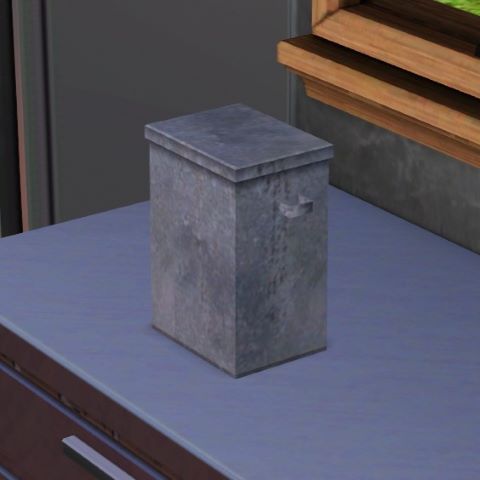
Delete an urn or tombstone

If you have a ghost frequently visiting your house during the late night hours, the reason is that you have a gravestone or an urn of ashes somewhere on your lot. One of the quickest and easiest methods for how to get rid of a ghost in Sims 3 is to pick up the grave or urn and delete it. Additionally, you can pick up the urn and put it in your sim’s inventory until you decide what you want to do with it. This will stop the ghost belonging to that gravestone or urn from spawning until you place it back down.

Move Grave to the Mausoleum

Mausoleum Sims 3

If you don’t want to forget the memory of the dead sim, you can also opt to move the grave to the mausoleum within your town. Head on over to the cemetery and click on the mausoleum building. Select the option “Manage the Dead”, this will allow you to add a gravestone or urn from your inventory to the cemetery by clicking and dragging. Your sim will still be able to visit the grave site, as well as potentially be able to see the ghost of the sim during the night when visiting the graveyard. Additionally, if you change your mind in the future, you can always head back to manage the dead and retrieve the tombstone or urn.

Release Spirit to the Netherworld

Release a ghost to the Netherworld in Sims 3

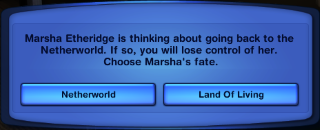
Releasing a spirit to the netherworld can only be done on a playable sim ghost. The main way to have a playable ghost is to get the science facility opportunity called “Oh My Ghost!”, which will attempt to bring your sim back to life. Rather than being brought back to life, they will be playable again as a ghost. You will find their tombstone within their own inventory. Click on the tombstone and you will see the option of “Release to Netherworld”. Once this is clicked, you will be prompted again to either release the spirit to the netherworld or stay in the land of the living. Once released to the netherworld, you will no longer see or be able to play as this ghost anymore.

In-Game Cheats

If you cannot figure out how to get rid of a ghost in Sims 3, you will always have the option to use cheats. Simply hit Control, Shift, and C. Once the text box pops up, write “testingcheatsenabled true”, then proceed to click on the ghost and select “Object” and “Delete It”. This will delete the ghost from the game. They will not be able to come back again, however, you will be able to keep the sim’s urn or grave. Their existence will not be entirely wiped from the game and their memory will remain within the family tree.

Resurrect the Sim

Resurrecting the sim is a surefire way for how to get rid of a ghost in Sims 3. Bringing the sim back from the dead will eliminate their ghost because they will no longer be dead. They will become a playable human in the active household once again. There are many different ways that you can choose to resurrect a sim. Some of the common methods are feeding ambrosia to a ghost or using a genie lamp. For more detailed information, check out our article on How to Resurrect a Sim in Sims 3!

Change Professions

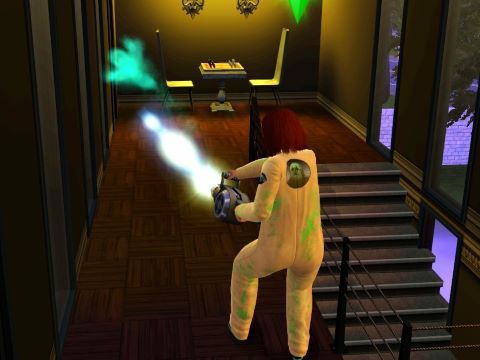
Ghost hunter in Sims 3

The Ambitions expansion pack brought in some new job options for sims. One of the new jobs that sims can be employed in is the Ghost Hunting profession. This profession makes it more likely that your sim will see ghosts. You will eventually get a Spook-o-meter, which will let your sim scan their surroundings for spirits. While this can be a fun career path to go down, it can also make ghosts appear when you don’t want them to. Change your career to a less spooky path and you will immediately begin to see fewer spirits in your vicinity.

Additionally, the ghost hunting profession will make it so that random areas in the town will be haunted. This allows for ghost hunters to come in and clear the area. You may end up with a neighboring lot that is haunted and playing spooky music. If ghost hunters do not come and this begins to bother you, you have the option of using mods to fix it. Using the NRAAS Story Progression mod, go into the Town Options and Select Career. Proceed to Disallow the Ghost Hunter career. This will stop the random hauntings associated with this profession in your town. You may continue to hear the sounds and music from the haunting for a couple of days but this will eventually stop.

Move Houses

If all else fails, you will have the option to entirely move houses to get away from the ghost. Ghosts will be tied to a grave or urn in almost all cases, which are found on a specific lot. Thus, moving to a brand new lot that does not have any trace of the dead sim will rid you of their ghost as well. Obviously, this can be inconvenient and cost you quite a bit of money. However, doing this will be a quick and simple solution to the problem.

Adding Mods

If you want to seek the help of a mod, there are a few to choose from. Here are some of the mods that can be added to the game to help you with how to get rid of a ghost in Sims 3:

  • Ghost Reaction Remover Mod: This mod is an excellent choice for someone who wants to keep the ghosts of old family members around. However, the ghosts affecting your living sims by causing reactions might get annoying, especially if they visit often. With this mod, you can choose to remove the reaction that sims have to ghosts when they appear. This can make your game much more peaceful! Check out the Ghost Reaction Remover Mod on Mod The Sims!
  • NRAAS Retuner: This mod will allow you to entirely disable ghosts from spawning in your game. This is a great mod to utilize if you do not enjoy the presence of ghosts within your games and do not want to play with that feature anymore. Check out NRAAS Retuner Mod!
  • NRAAS Master Controller: If you have a playable ghost, you will be able to change the occult status of them back to a human state. If they are not playable, you can still change their occult status, but they will not be part of your household. You will have to add them back into the active household to play them. Check out NRAAS Master Controller Mod!

Reset Sim

If you are having trouble with a ghost that is not returning to their grave at the time that they should, you can choose to reset the sim. This will immediately return them to their gravestone. You will not see the ghost again until they randomly spawn again at night. This will reset any bug associated with the ghost.

How to Summon a Ghost in Sims 3?

Mourning at grave

In order for a ghost to be summoned, you must have a tombstone or an urn on your lot. Additionally, it will make it significantly more likely that the ghost will spawn at night if sims are mourning at their grave. Getting a ghost to spawn is the first step for many of the methods listed above.

Text-Based RPG Games for Android: Written Gameplay

0

Are you looking for a game that focuses less on its graphics and more on its immersive story and gameplay? These text-based RPG games for Android are sure to captivate and give you hours of entertainment. Whether you’re seeking gripping stories, deep character customization, or riveting adventures, these games will deliver.

Table of Contents

Grim Quest and Grim Tides

Grim Quest and its prequel Grim Tides are two of the best text-based RPG games for Android that you can find. Both are very similar in gameplay, with Grim Tides having a slight graphical and art edge over its predecessor. Each of these games has a robust character and stat system that allows you to tailor to several different play styles. Between the many different weapon types and various forms of magic, picking the right combination of upgrades, traits, stats, and clothing is critical for maximizing your character’s potential. The dungeons themselves are pretty basic but challenging nonetheless. They are simply square grids where you must explore each square. Combat is turn-based and different weapons, abilities, and magic allow you to target different numbers of enemies. Sometimes keeping things plain and simple is a good formula for a rewarding gameplay loop.

Both games have deep storylines that complement the game loop nicely and allow for a vibrant array of different enemies and bosses to appear. The first of the two, Grim Quest, takes place in a dark dreary world that is on the verge of collapse. In a search for power, a once great empire opened a terrible dimensional rift called the Tear. This released untold horrors into the world, resulting in the empire’s downfall. The only haven is Ashborne, and it is from this city that you will set out on your quest to rid the world of evil. Since Grim Tides is the prequel, it takes place before the opening of The Tear and the fall of the empire. In this game, you are a convict sent on an Imperial mission into untamed lands. Having few other options, you set out on your quest into a perilous wilderness hoping better fortunes await you.

Check out Grim Quest on the Google Play Store!

Check out Grim Tides on the Google Play Store!

Magium

If you’re looking for a fully narrative-driven experience from text-based RPG games for Android, Magium is an excellent choice. More of an interactive book than a game, it has a deep list of outcomes and options for you to explore. By weaving in a stat point system, it also finds a way to make you think more about your choices and what strengths you have. This is because you can make a choice and it does not tell you what stats it might require or even that a stat check is coming at all.

In Magium, you will often have to simply read between the lines or end up failing. Regardless, the game offers an adventurous story that you can put your unique mark on. Additionally, there are also many rich and deep characters that you can befriend and even engage in romance with. Your choices with each of the characters will carry on through several chapters and books.

Check out Magium on the Google Play Store!

Lifeline Series

While RPG should be applied loosely to this game, the Lifeline Series’ choice-driven narratives that allow you to role-play as someone’s only hope of survival are very unique. This interactive story features an individual in a dire survival situation, where you are their only source of communication. You will be given options for what to say to them to help guide them and influence their actions and decisions.

During your first play-through for a story, you may even have to wait for a response sometimes while a character is busy. This generates the impression that you are communicating with someone who is truly stuck in this situation and trying to survive. If the choices you make lead to the person’s demise, you will be brought back to a previous decision where you must retry and find a new path through the story. There are currently 8 Lifeline games, the first one centers around an Astronaut named Taylor who is stranded on a hostile foreign planet with only you to talk to. Can you get them out of their perilous situation alive?

Check out Lifeline on the Google Play Store!

CyberCode Online

Next on our list of text-based RPG games for Android is the cyberpunk-themed CyberCode Online. This game is an MMO that you can play with friends or make new ones as you go. You will gather items and gear as you traverse various dungeons and complete quests like the typical RPG. Dungeons can be played with other players so you can work together to defeat difficult enemies and bosses. The dungeons are simple ASCII character arrangements, so while they may not be pretty, they will be easy to navigate. All the locations, gear, and items are all cyber-themed. The currency is BTC and you will use futuristic weapons like lasers while crafting with various tech and computer parts. CyberCode Online is one of the best text-based MMO games for Android you can find. It is perfect for those looking for a multiplayer option.

Check out CyberCode Online on the Google Play Store!

SimpleMMO

If you are looking for another multiplayer option, SimpleMMO is worth considering. Featuring both PvE and PvP, this game has plenty of content and complexity to it even though it is text-based. There is some charming pixel artwork and small animations to complement the simple gameplay. The main premise of the game is to journey from town to town by taking steps to gather gold, experience, and gear. You can do it alone or with other players to earn more quickly. While taking steps you can also encounter random enemies or other players.

Outside of traveling, there is a battle arena where you can fight PvE enemies or engage in PvP battles with other players. SimpleMMO also allows the formation of guilds. This gives the game its main goal, which is to contribute to your guild. Your guild will give you other people to travel with and a team to battle alongside in PvP group battles called guild wars. If you’re looking for text-based RPG games for Android to play with your friends, give SimpleMMO a try.

Check out Simple MMO on the Google Play Store!

Sorcery! Series

This four-part RPG series is based on the original adventure gamebook series “Steve Jackson’s Sorcery!” and delivers an exciting D&D-style experience. You are a hero on a quest to retrieve the magical Crown of Kings that has been stolen by an evil archmage. You will use combat and magic to fight all sorts of monsters and lawless evil as you travel. Both the magic and combat systems rely on stamina which also acts as your health. You lose stamina when hurt in battle or by doing magic spells, and if you run out of stamina it is game over. The magic system involves memorizing letter combinations for each spell and using the available letters during encounters based on the phase of the moon to cast them. Some spells will also require certain items or equipment to cast them.

The combat system in Sorcery! involves trying to predict your opponent’s next move. The goal is to choose a strength of attack each turn that is greater than your opponents. The catch is that you have a limited amount of strength and using some up means you will have less for the next turns. If someone chooses to use no strength and only defend, they will receive reduced damage from the incoming attack. This means that if a large amount of strength was used in the attack, it would be a waste. If you can predict someone is going to defend, you can use a very weak attack to conserve strength but still deal damage. However, if they do not defend and instead use a stronger attack than your weak attack, you will instead take significant damage. It boils down to a rock, paper, scissors-type mind game.

Check out Sorcery! on the Google Play Store!

Lone Wolf Saga

Here is another gamebook-to-app conversion that deserves recognition among text-based RPG games for Android. Lone Wolf Saga is based on the Lone Wolf books by Joe Dever. You are a warrior monk known as a Kai Lord who must save the fictional world of Magnamund. At the beginning of the game, you roll a combat skill level and an endurance level. You will then pick five Kai disciplines for your character that will give you various advantages. From there you set out on your quest and face various decisions.

When facing an enemy, your combat skill will be compared with the enemy’s, and a combat ratio will be given to determine how much damage will occur when rolling for attacks. The more the combat ratio is in your favor the less damage you take and the more you deal. To attack, you roll a number 1-10 and based on the combat ratio, damage will be dealt to you and the enemy. The higher the number, the better the result.

Check out Lone Wolf Saga on the Google Play Store!

Path of Adventure

Path of Adventure is a fantasy adventure that is sure to please. As far as text-based RPG games for Android go, this single-player gem has everything you would expect: a riveting tale, plenty of treasure, a diverse array of weapons, and monsters to vanquish. Like most of these text adventures, you follow the narrative making choices along the way. The weapons and equipment have offensive and defensive values. The offensive values can be used to take on enemies, while the defensive values will reduce incoming damage when used to block. Additionally, the game has several classes that impact the game in various ways. Path of Adventure has a lot of replayability due to the different classes and because of its difficulty settings. Once you start playing, it will be hard to put it down.

Check out Path of Adventure on the Google Play Store!

Life in Adventure

The final game on our list of text-based RPG games for Android is Life in Adventure. This interactive adventure is accompanied by wonderful pixel art. You will set out on a D&D-style adventure that you make your own. There is the option to either play a random adventure or customize your own. Customizing your own allows you to choose your name, avatar, trait, stat distribution, and weapon set. You will be faced with various events, opportunities, and encounters that you will have to make careful decisions about if you are to make it to the end of your adventure in one piece. There are various DLCs that you can buy to add additional storylines and subplots to the game, however, the free base experience is very enjoyable. Life in Adventure is a wonderful and vibrant experience.

Check out Life in Adventure on the Google Play Store!

Cold Hands While Gaming: Top 5 Proven Solutions

Are you chronically cold while playing video games? Not only are cold hands uncomfortable but they can hinder your gaming performance. This is even more significant during games where reaction time and speed are necessary. In this article, we will explore the reasons for cold hands while gaming and the best solutions to the problem.

Table of Contents

What Causes Cold Hands While Gaming?

There are many causes of cold fingers and hands while playing video games. Luckily, many of these issues can easily be addressed to bring you back to the top of your game. The main causes of hands becoming cold while gaming are a cold room, stress and tension, or poor posture and circulation. A lack of movement while intensely playing a video game can contribute to poor circulation, leading to your hands feeling cold. Additionally, games that cause stress and tension can cause your body to stay in a fight or flight mode. This directs blood away from the limbs and into the body’s core. Poor posture can contribute to the cold sensations in your hands due to blood vessels being constricted as you sit in an awkward position for an extended amount of time. For many gamers, more than one of these causes may be simultaneously contributing to your cold hands while gaming.

How to Fix Cold Hands While Gaming

The most obvious cause is gaming in a cold environment, which can be fixed by warming the room or using products that warm your body. Poor posture can contribute to a lack of proper blood circulation in your arms, so it is recommended to sit straight with good posture. Therefore, a good ergonomic chair can drastically help you to maintain a proper position and increase circulation. This allows the blood to properly travel through your body without being restricted. Additionally, it is important to remember to stay hydrated and stand up to stretch periodically to help your blood flow and keep your muscles relaxed. Many unique products are on the market to address this common problem for gamers and office workers alike. The following products are gamer-approved and are excellent for keeping you warm and comfortable while playing video games.

Homall Ergonomic Gaming Chair

An ergonomic gaming chair is essential for a gaming setup. These seats will provide you comfort for your long video game sessions, as well as assist in proper posture. This helps to prevent unnecessary stress on your muscles, while also allowing for optimal circulation. An ergonomic chair will allow your body to have better blood flow and warmth, ultimately stopping you from getting cold hands while gaming.

The Homall Gaming Chair is an awesome choice for gamers looking for an affordable ergonomic chair for their gaming rooms. It features an ergonomic design with high-density shaping foam that contours to your body’s shape. This chair reclines, swivels, and has a rocking feature built-in, making it an excellent choice for all types of people and setups. Not to mention it looks extremely sleek and comes in many different colors to choose from!

Check out the Hormall Gaming Chair on Amazon!

Hoodie Blanket

A hoodie blanket is an excellent product to get yourself or give as a gift to the gamer in your life. A hoodie blanket allows you to keep a blanket on top of yourself while also allowing your hands to move freely outside it. These types of products are excellent for keeping someone nice and warm for their gaming sessions. Not to mention they are extremely comfortable due to the soft blanket fabric. They do not directly cover your hands, however, they do a great job of keeping your overall body temperature up. This will aid in keeping your hands and fingers warm as well. On top of that, you can wear these anywhere and be just as warm as if you were covered by a blanket. It’s no wonder these have become so popular!

Check out THE COMFY Hoodie Blacket on Amazon!

Xuenair Heated Mouse Pad Hand Warmer

A heated mouse pad hand warmer is a product that will sit above your hand on a mouse. This device will generate heat down toward your hand, keeping it nice and warm. This is a direct solution for a computer gamer who is dealing with cold hands while gaming. Alternatively, there are mouse pad hand warmers that are not electric, which are meant to have your mouse slipped inside to keep your hand warm. These tend to look like large slippers on your desk for your hands.

The Xuenair heated mouse pad hand warmer is small in size and extremely portable. It works similarly to a personal space heater and features three heat levels that will generate temperatures of 100°F, 120°F, and 140°F to warm the hand that sits on a mouse. This is a quiet unit that blows the heat down toward your hand to keep it at a warm temperature. This unique solution is excellent for computer gamers who have to keep their chilly hands out for long periods to play their favorite game. When you are finished playing video games, simply fold the device up to store it away for next time.

Check out the Xuenair Heated Mouse Pad Hand Warmer on Amazon!

ICasso Heated Desk Pad

A heated desk pad is used on top of the desk where your hands rest on your keyboard or mouse. This heated pad provides plenty of warmth near your arms and hands, keeping them nice and toasty while you are gaming. Alternatively, you can opt to keep your feet warm on the floor if you experience your lower extremities getting cold as well.

The ICasso heated desk pad is a favorite of gamers who seek warmth during their computer time. It comes in many different colors and designs, giving you plenty of options for your setup. This is a large desk pad that is 31.5 inches by 13 inches, which will provide you plenty of space to put your keyboard and mouse on top of. Additionally, this means plenty of space for your feet if you want to put it on the floor. This pad has three temperature settings of about 100°F, 108°F, and 115°F, with quick heat technology to deliver you warmth in a short amount of time. This is a very nice-looking addition to any gaming room that needs a bit of warmth and color.

Check out the ICasso Heated Desk Pad on Amazon!

OCOOPA Rechargeable Hand Warmers

Rechargeable hand warmers have many amazing uses for keeping your hands nice and warm. These hand-sized devices are great for holding onto between matches or keeping near you for warmth. Additionally, these are extremely handy for going outside during the winter, cold weather camping, or for people who are always cold in general. These small units make for amazing gifts or stocking stuffers for many types of people!

The OCOOPA Hand Warmers come in a lot of different color choices to fit your style. The unit has three levels of heating, depending on what your preference is. The temperature levels range from 95 to 107°F, 104 to 118°F, and 118 to 131°F which will heat both sides. This is sure to provide you with plenty of warmth and a solution for how to fix cold hands while gaming. This hand warmer is powered by a USB rechargeable 5200mAh battery, making it a perfect, convenient, and portable choice to keep your hands warm.

Check out the OCOOPA Hand Warmer on Amazon!

Best DAC Amp for Gaming: Top 5 Choices for Gamers

Are you looking for a way to up your competitive gameplay? Audio quality can make a substantial difference in the world of gaming when hearing the sounds around you is essential. In this article, we will go over the best DAC amp for gaming that you can buy today.

Table of Contents

What are DAC Amps?

A DAC, also known as a digital-to-analog converter, does precisely what the name implies. Audio is stored as digital signals on a computer or other technological device. Headphones and speakers require analog signals to play. This means that computers, phones, and other devices that store audio will have a DAC inside of them. A DAC amp converts a digital audio signal into an analog one while utilizing an amp that improves the sound quality and amplifies the sound. This allows for the sound to come through more dynamically with increased loudness. Therefore, you get improved audio that sounds crisp, clear, and powerful. The more high-end DACs will deliver substantially better sound.

Using a DAC amp alongside your headphones or other listening devices will improve the audio quality. A DAC amp can reduce any noise or interference to improve the clarity of your sound. They will also allow for better separation of audio, allowing for different aspects of sound to come through clearly. This can be a big deal in gaming, as there are a lot of different layers to a game’s sound. You will be better able to hear the finer details, such as enemy footsteps, weapon fire, communications, and abilities. This provides you with a more in-depth experience as you are more fully immersed in the atmosphere of the game. Additionally, it allows for a greater ability to hear directional sounds within your games. DAC Amps can provide you with a substantial advantage over your opponents.

What is the Best DAC Amp for Gaming?

The best DAC amp for gaming is going to provide great clarity, separation, and direction to your game sounds. While also decreasing noise, increasing volume, and being affordable. The best DAC amps for gaming that you can buy are the Schiit Fulla E, Mayflower Arc MK2, SoundblasterX G6, Fiio K7, and the Fosi Audio K5 Pro. Additionally, DAC amps work best when paired with a headset that has specifications that benefit from the added power provided by them.

Schiit Fulla E

The Schiit brand DAC amps are a popular choice among gamers for good reason, these devices are made in the USA and have superior sound quality. The Fulla E is similar to previous versions with some beneficial upgrades. It can be plugged into any device that has a USB-C port, allowing it to be connected to the PS5, PS4, Switch, and mobile phones. Getting this DAC amp connected to the computer is a breeze. Whether you’re into gaming, movies, television, or even music, the Fulla E is an outstanding and well-rounded option for gaming and entertainment alike. This version of the device is more compatible with consoles and has an added optical input. This added optical input will allow you to connect to many smart TVs, which previous versions could not do.

The Schiit Fulla E has a solid construction that feels sturdy and durable. Positioned on the top of the DAC amp, you will find a large and easy-to-use knob that controls the volume. And don’t worry, this unit does have a 24-bit microphone input for your gaming sessions with your friends. The amount of power, alongside the low impedance, that the Fulla E outputs should be more than enough for most gaming headsets or IEMs. This version of the Fulla proves to be a slight improvement over its predecessors with its ability to minimize noise and increase sound quality within your gaming audio. The Fulla E is an excellent pick for the best DAC amp for gaming if you are looking for an unbeatable audio experience.

Check out the Schiit Fulla E on Amazon!

Mayflower Arc MK2

The Mayflower Arc MK2 DAC amp is made in the USA and comes with a higher price tag than some others on this list. However, this unit has done an excellent job of being a well-rounded DAC amp that does exactly what it is supposed to do. The Arc MK2 has an excellent build quality that has a timeless and clean look, while also being pretty small in size. The small size means it is very portable and easy to add to small spaces. This device is driver-free and fully compatible with all computer systems, such as Windows, Mac, and Linux. Additionally, it supports PlayStation 4 and 5, and it comes with an optical connection that can be utilized for audio on Xbox. Connecting this DAC amp to other devices is extremely easy due to the USB connection, which allows for greater compatibility.

It has a built-in bass boost to give your sounds even more intensity while playing video games, especially with headsets that lack that punch. You will find a volume control knob located in the center that will effortlessly adjust your audio levels. It comes with a switch for low or high gain, as well as a switch to change between outputs. Mayflower worked hard on making their microphone outputs better from the older version, so this version has a powerful mic that comes through crisp and sounds a whole lot better. The Mayflower Arc MK2 is a great choice for gaming and communicating with your teammates.

Check out the Mayflower Arc MK2 on Amazon!

SoundblasterX G6

The SoundblasterX G6 deserves a top spot on our list of the best DAC amp for gaming. This is a popular and powerful DAC amp that is excellent at reducing distortion while being capable of outputting crisp and extremely loud audio. This DAC amp connects seamlessly via USB to PlayStation and Nintendo Switch. However, getting it to work with the Xbox is a bit more difficult, as you will need to connect via the optical ports. Connecting it to a computer is simple and has the advantage of gaining access to the provided software that lets you control additional settings. This small device boasts an easy-to-control knob on the side, which allows you to conveniently control the game and chat volumes.

The SoundblasterX G6 has dual amps within the device, which means that each side of your headset will get powered individually. This provides a powerful input to your headset, giving you even better audio for all sound ranges. The DAC amp comes with unique modes to use, such as Scout Mode, SBX, and low or high gain. Scout mode is a highlight of this unit, which works by separating the different layers of sound within the game. This keeps the sounds from being muddied together and allows for detailed sound to come through. Scout mode is an amazing feature for competitive games where being aware of the noises around you is essential to knowing the placement and status of your opponents. The SoundblasterX G6 also boasts a 7.1 Dolby surround sound to increase sound accuracy and make the audio more immersive.

Check out the SoundblasterX G6 on Amazon!

Fiio K7

The Fiio K7 is a versatile DAC amp that offers a lot for the price that it’s sold at. It comes in two basic color choices: black and red. This device boasts a THX amp and dual DACs in one sturdy piece of audio equipment. The aluminum alloy construction gives it a solid and well-designed feel. Like many DAC amps, you can choose to use it as only an amplifier or as an amp with the DAC. On top of all that, the Fiio K7 has Bluetooth connectivity that will allow you to wirelessly connect to your other devices. The other output options for the Fiio K7 are optical, USB, RCA, and coaxial lines.

This unit provides a switch that you can easily adjust your gain levels from low to high. The Fiio K7 also has three modes to choose from, including the preamp, headphone amp, or DAC modes. Additionally, there is a centrally located volume knob on the front that will allow you to seamlessly adjust your sound levels. The Fiio K7 is a loved and trusted device that will deliver high-end sound quality for a great price. It comes with a tremendous amount of power that will be able to handle demanding headsets. Furthermore, this DAC does an excellent job of reducing any distortion or noise within your audio, giving you immensely better sound quality and clarity. This is the best DAC amp for gaming if you are seeking a well-priced and versatile product that will make your gaming experience significantly better.

Check out the Fiio K7 on Amazon!

Fosi Audio K5 Pro Gaming DAC Amp

The Fosi Audio K5 Pro is a lesser-known but great DAC amp if you are looking for an affordable device that won’t break the bank. This DAC Amp is small and portable, making it great for compact spaces. Featuring a microphone input, this unit is an upgrade from their previous version. The Fosi Audi K5 Pro is driverless, so it can be plugged in and ready to use immediately. The USB connection, as well as the plug-and-play ability, makes this unit highly compatible with many other devices. This DAC amp is compatible with PS5, PS4, Xbox, Nintendo Switch, computers, mobile phones, and even televisions.

Additionally, the Fosi Audio K5 Pro has optical and coaxial inputs you can utilize. A unique aspect of this DAC amp is the three controls on the front. Each knob allows you to adjust aspects of the sound, such as the bass, treble, and volume. This allows for extra customization of your sound preferences in an easy-to-access way, adding so much more detail to your gaming experiences. The Fosi Audio K5 Pro is the best DAC amp for gaming if you are looking for an affordable product to up your gameplay.

Check out the Fosi Audio K5 Pro Gaming DAC Amp on Amazon!

Best Superhero Games for Android: Epic Mobile Battles

0

Video games allow you to immerse yourself in the world of your favorite superheroes. Whether you’re a Marvel, DC, or even a Power Ranger fan, you can play as your favorite character anytime and anywhere. Feel the thrill of wielding superpowers in our top picks for the best superhero games for Android.

Table of Contents

Marvel Snap

First on our list of best superhero games for Android is Marvel Snap. This strategy card game lets you assemble a deck of your favorite Marvel heroes and villains to face other players in battle. You will fight over three unique locations that each have a special attribute to them. By winning two of the three locations, you will win the game. Having different locations every time will ensure that a match is never the same and can drastically affect which deck has an advantage. A deck could be hard countered by an opposing deck but still win due to advantages received from the locations. Marvel Snap allows you to play all of your favorite heroes and villains at various places within the Marvel Universe.

The game’s ranking system is based on cubes, which you gain or lose depending on if you win a match. This is where snapping comes into play. When you snap, the amount of cubes the match is worth doubles at the start of the next round. Your opponent can choose to retreat and only lose the cubes currently at risk. However, they could also choose to snap back and make the next round worth quadruple the cubes. The amount of cubes that the match is worth also doubles at the end of the final round if neither player retreats. This adds a unique risk and reward factor to every match.

Check out Marvel Snap on the Google Play Store!

Marvel Strike Force: Squad RPG

Marvel Strike Force is a squad-based strategy game. Assemble a squad of good or bad guys and complete campaign missions for either the heroes or villains. You will gain rewards for completing missions and challenges, which can be used to level up and upgrade your various characters. This progression system allows for many hours of gameplay and entertainment. Strike Force is the best way to assemble your own team of Avengers or Anti-Avengers and engage in epic battles.

Combat gameplay for Marvel Strike Force is turned-based. Your squad will line up against various enemies, and each side will take turns using abilities and powers in an attempt to defeat the opposing side. Witnessing each hero utilize their unique signature move and superpowers is a lot of fun. The combo moves featuring multiple characters add an extra layer of entertainment. It is a simple system, but the Marvel aesthetic suits it perfectly. Working towards new characters and upgrading them to make more powerful squads will keep you hooked on this game for a long time. Marvel Strike Force is among the best superhero games for Android.

Check out Marvel Strike Force on the Google Play Store!

Batman: The Telltale Series

If you’re a Batman fan then this telltale series game is a must-play. Like other telltale games, it is narrative-driven and allows you to make critical choices as Gotham’s dark knight. Play through several storylines making your mark on the final outcome. While this game is more of an interactive movie, the action and amount of choices keep this game captivating and engaging. There are five episodes in total, giving Batman fanatics plenty of lore to enjoy and decisions to make.

Check out Batman: The Telltale Series on the Google Play Story!

Marvel: Contest of Champions

Marvel: Contest of Champions is a Marvel character version of Mortal Kombat. While this game does not have the gore and visceral visuals that Mortal Kombat has, it does hold its own as an excellent fighting game. The distinctive powers and fighting styles of all the unique Marvel heroes and villains translate well into the fighting game genre. The different combos and abilities they bring are very satisfying to play. There is both a PvE campaign mode and a multiplayer PvP mode. Those who are fans of ranked gameplay will enjoy duking it out with other players to climb the ranked ladder. This is an excellent fighting game and deserves inclusion in a list of the best superhero games for Android.

Check out Marvel: Contest of Champions on the Google Play Store!

Ninja Turtles: Legends

Like Marvel Strike Force, Ninja Turtles: Legends is also a squad-based tactical game. Rather than your squad consisting of Marvel characters, it will be made up of the various heroes and villains of the Teenage Mutant Ninja Turtle universe. This is a great option for those looking for a superhero game that is not part of the Marvel or DC universe. The Ninja Turtle characters are a lot of fun and as a result, this game is thoroughly entertaining. The combat is turn-based, with the characters from both sides picking targets to hit with their strikes or abilities. The art and animations add an exciting dimension to the game that Teenage Mutant Ninja Turtle fans will appreciate. So take a squad of your favorite TMNT heroes and villains and dish out some radical beatdowns in Ninja Turtles: Legends.

Check out Ninja Turtles: Legends on the Google Play Store!

Injustice 2

Injustice 2 is a DC fighting game similar to Marvel: Contest of Champions. For those looking to take their favorite DC heroes and villains into the fight, this is one of the best superhero games for Android. Want to reenact Batman vs. Superman? This game has you covered and more. Additionally, the campaign story is very good and has 12 chapters with several battles in each chapter. There are several other game modes including challenge, arena, and raid modes. The game has a ton of content to keep the action and fighting going. If you’re a DC fan and are looking for a mobile fighting game, then Injustice 2 is perfect for you.

Check out Injustice 2 on the Google Play Store!

Marvel Future Fight

As an action RPG game, Marvel Future Fight lets you play as characters from the Marvel Universe while you fight your way through various levels. Immerse yourself in the Marvel world with hours of action-packed gameplay and interesting stories within the game’s campaigns. There are over 200 characters that you can collect and level up. The combat gameplay features several abilities for each character and allows you to swap between the three members of your roster. With 200 characters this leaves thousands of roster combinations at your disposal. The gameplay of Marvel Future Fight is fun and engaging, with plenty to grind towards. The plentiful content makes this game an excellent source of entertainment.

Check out Marvel Future Fight on the Google Play Store!

Spider Fighter 3

Spider Fighter 3 is an action-adventure game that is basically a rip-off of Spiderman. However, this doesn’t mean it isn’t a fun and entertaining game for those looking to beat up bad guys and swing around shooting webs. When you enter a level, you will need to defeat the bad guys and thugs within it. You will receive a reward for each level in the form of cash for buying and upgrading abilities. The combat is pretty straightforward, with basic hits being available all the time and more advanced abilities having cooldown timers. It is a simple game but still worthy of being among the best superhero games for Android.

Check out Spider Fighter 3 on the Google Play Store!

Power Rangers: Legacy Wars

Power Rangers: Legacy Wars adopts a classic fighting game style but with a Power Rangers theme. Much like Marvel: Contest of Champions and Injustice 2, this game allows you to battle as your favorite characters from their respective series. In this game, you will find the various power rangers and villains from all the different generations. This game is entirely PvP, so you will be pitted against other players depending on your rank. As you win battles, you will earn rewards to upgrade and collect new characters. It is a basic fighting game that is perfect if you were ever a fan of the Power Rangers.

Check out Power Rangers: Legacy Wars on the Google Play Store!

TMNT: Shredder’s Revenge

The final game on our list of the best superhero games for Android is another Teenage Mutant Ninja Turtles-themed one. TMNT: Shedder’s Revenge is an arcade-style side-scrolling action game. You can play as Leo, Raph, Donnie, Mikey, April, Master Splinter, or Casey Jones. Can you stop Shedder from executing his latest evil plan? This game has plenty of retro vibes and exciting gameplay. You will forget you’re on your phone and not at the arcade worrying about how many quarters you have left.

Check out Shredder’s Revenge on the Google Play Store!

Best Stocking Stuffers for Gamers: 10 Fun Choices

Are you searching for the perfect small gifts for the gamer in your life? We have compiled a list of ten ideas for stocking stuffers for gamers. Each of these gifts is sure to make someone who loves video games and technology excited on Christmas morning. And, of course, don’t forget to add some candy!

Table of Contents

Razer Naga Trinity Gaming Mouse

If the PC gamer in your life does not have a gaming mouse yet, this is the perfect gift for them. A gaming mouse can be a game-changer for people who like to play competitive video games. This style of mouse adds many additional buttons that are able to be programmed, allowing for quick and convenient usage. On top of that, they are ergonomic and very sleek-looking.

The Razer Naga Trinity gaming mouse is a perfect option for a gamer. You won’t need to ask the recipient about what type of gaming mouse they would prefer because this mouse offers three different interchangeable side pieces. Each side piece has a different amount of buttons and arrangements, giving you plenty of choices to choose from. The Razer Naga Trinity has a 16,000 DPI sensitivity level that can be easily changed at a moment’s notice with the DPI buttons. Gaming mice make for amazing stocking stuffers for gamers.

Check out the Razer Naga Trinity Gaming Mouse on Amazon!

Razer Universal Quick Charge Stand for Controllers

Wireless controller charging stands are great stocking stuffers for gamers who play on consoles or use controllers. This is an excellent gift if the gamer in your life struggles to keep their devices charged. Alternatively, this will completely stop them from having to constantly recharge or buy new batteries. They will no longer be bothered by their controller randomly dying in the middle of a match!

This Razer Universal Quick Charge Stand is offered in multiple beautiful colors, giving you plenty of options to fit your loved one’s style. Razer is a well-known and highly trusted brand within the gaming community, so this is sure to impress! It will charge your controller in record time, fully charging in under three hours. The Xbox controller charging stand works with both the new Xbox Series X|S controllers, as well as the Xbox One and Elite Series controllers. Additionally, the Razer Universal Quick Charge Stand for Playstation will charge PS5 DualSense wireless controllers. This charging stand is able to be easily connected via USB to a console, PC, or wall plug.

Check out the Razer Universal Quick Charge Stand for Xbox on Amazon!

Check out the Razer Universal Quick Charge Stand for Playstation on Amazon!

KontrolFreek Performance Thumbsticks

A performance thumbstick is the perfect stocking-sized gift for the console player in your life. These are especially good for people who play first-person shooters or other games where accuracy and precision are important. KontrolFreek performance thumbsticks are well-known and highly trusted by gamers. They offer grips and thumbsticks for both Xbox and Playstation controllers.

The KontrolFreek thumbsticks are made of rubber to increase the grip on the joysticks. This prevents any slipping or sliding that may occur, limiting potential mistakes during gameplay. Additionally, this helps keep fingers and hands more comfortable because extra force is not needed to make sure they stay in place. These grips also help protect your thumb sticks from wear and tear due to the rubber covering.

Check out KontrolFreek Performance Thumbsticks for Xbox on Amazon!

Check out Kontrolfreek Performance Thumbsticks for PlayStation on Amazon!

Blade Hawks Gaming Mouse Pad

Every gaming setup will benefit from a gaming mouse pad. Gaming mouse pads offer increased precision and accuracy of the mouse due to the smooth surface underneath. This increases the sensor’s responsiveness and tracking, as well as reducing any friction. The material that the mouse pads are made of provides a bit of comfort for the wrist to rest on, making for a well-rounded and comfortable gaming space.

The Blade Hawks extra large gaming mouse pad lights up with RGB colors to give a gaming station a bit of flare. It also features 10 lighting modes, which consist of 7 static and 3 dynamic mode options. The mouse pad is completely plug-and-play and connected via USB. Additionally, it is completely waterproof, so any accidental spills won’t be a big deal. The back is nonslip, so this pad will stay firmly in place.

Check out Blade Hawks Gaming Mouse Pad on Amazon!

Headset Stand

Every gamer has a headset that they use when they play video games. A headphone stand can help organize their desk to keep it neat and tidy. It also aids in protecting the headset from any unnecessary damage that may occur as it sits out. This is one of the best stocking stuffers for gamers because it helps them maintain their headsets. After all, we know how expensive they are!

You’ll be able to choose from multiple varieties of stands, depending on what the gamer in your life would be more likely to utilize. Basic headset stands will keep their headset secure and up off the desk. Some headset stands can be plugged into the wall and provide multiple USB outlets for other devices to hook up to. This can be perfect for the gamer who has many gadgets. Additionally, there are varieties that clamp to the side of a desk, giving them more space for their other gaming accessories.

Check out the Top Headset Stands on Amazon!

Cable Organizers

Cable organizers are excellent stocking stuffers for gamers who want to (or need to) clean up their gaming station. There are two main types of cable organizers. The first option is a cable organizer sleeve, which will contain all of the cables within one space. This holds cords in one central location, so the cords don’t get stuck or become irritating around or under the desk. The second option is cable organizer clips or holders, which individual cords are snapped into. This keeps them each in one spot or allows for them to be run along the edges of a desk. Additionally, you can buy sets that contain many of each type to give your gamer many different options to choose from. This will allow them to figure out what suits their setup best.

Check out the N NOROCME Cord Management Organizer Kit on Amazon!

IEMs

IEMs are one of the most elite stocking stuffers for gamers. In-ear monitors can significantly enhance a gamer’s competitive play by allowing them to better hear the sounds around them. These audio devices have high-quality drivers inside of them, allowing for detailed sound to come through. They allow someone to be able to better gauge the distance and direction that a sound is coming from. With this information, they will be able to more accurately determine the location of footsteps and enemy weapons. This can be the ultimate upper hand in a game where the other players don’t have the same level of audio. Read more about the Best IEMs for Gaming here on our site!

Check out IEMs for Gaming on Amazon!

Hanayama Metal Puzzles

Metal puzzles are not directly correlated to the hobby of gaming, however, they are beloved by many people who also enjoy playing video games. These puzzles offer an intellectual challenge that makes you utilize your problem-solving skills in a unique way. The Hanayama metal puzzles range from easy to very difficult. Additionally, puzzles are proven to be very good for your brain! This is a very affordable and fun gift to give to someone that will keep them occupied for hours on end. Metal puzzles easily become a group activity as they get passed around to solve. Gift your favorite gamer a different style of mental stimulation for Christmas morning!

Check out Hanayama Puzzles on Amazon!

USB Desk Fan

Ever heard of the gamer sweats? Gaming sessions can be long and intense as you battle your way to victory. A USB desk fan can come in very useful as a small and portable cooling device for the gaming room. Since the fan connects via a USB cord, it won’t take up any space in your outlets! Additionally, you will also be able to run this small fan from a power bank or USB plug, making it an excellent gift for someone who enjoys camping or as a savior when the power goes out on a hot day. This doubles as a handy gaming gift and a helpful tool! These USB fans are a small portable size that will easily fit on your desk, no matter what size space you are working with. These fans are quiet and powerful, offering plenty of airflow around a gaming setup.

Check out the JZCreater USB Desk Fan on Amazon!

Keyboard Cleaning Gel

Every gamer needs to clean their keyboard every once in a while. This can be a difficult and time-consuming task if you don’t have the right products. Keyboard cleaning gel offers a very simple and convenient way to quickly clean your devices. The gel gets between the keys and picks up any dirt or debris. It can even be used on many other surfaces such as in your car. Keyboard cleaning gel is one of the most helpful stocking stuffers for gamers and will make their lives a bit easier. You do need to replace the gel every so often because it will eventually get dirty, so you might want to get two!

Check out Colorcoral Keyboard Cleaning Gel on Amazon!

10 Best Post Apocalyptic Games For Android: After the End

0

Looking for some mobile games to help you prepare for the downfall of civilization as you know it? These are some of the greatest post apocalyptic games for Android that are guaranteed to give you your fix of survival and anarchy. From zombies to war, to nuclear devastation, these games will allow you to immerse yourself in a world where the remnants of humanity are struggling to survive.

Table of Contents

Fallout Shelter

Fallout is a renowned series, so it comes as no surprise that Fallout Shelter is one of the best post apocalyptic games for Android. This is a colony simulation game where you get to run your own vault. You will need to manage resources such as power, food, water, stimpak, RadAway, and caps. These are all needed to keep your vault thriving and expanding. You will gain new vault dwellers from the wasteland or by having your existing dwellers have babies. Each dweller will have a level and their own S.P.E.C.I.A.L stats that allow them to accomplish different tasks.

Due to this being a Fallout game, your vault is sure to have its share of dangerous events. This will mostly be fires at first, but soon enough you will have radscorpions threatening your inhabitants. Good thing the game allows you to outfit your vault dwellers with many of the iconic weapons and armor from the series to keep them safe. You will also be able to send your well-armed vault dwellers to explore and complete quests out in the wasteland. These will reward you with various items, weapons, clothing, and other resources that you can use back at your vault. If you’ve ever wanted to be an overseer, then this game is your chance to test your post apocalyptic leadership skills.

Check out Fallout Shelter on the Google Play Store!

Atom RPG

Atom RPG is a top-down turn-based game that takes place in what is left of Soviet Russia after a nuclear war has destroyed civilization as it once was. You are a member of ATOM, an organization that was once part of the Soviet government before its collapse. Their mission is to rebuild the motherland to its former glory and improve humanity’s quality back to its pre-war state. Your adventure starts when you set out to investigate the disappearance of a missing squad. Out in the harsh wastelands, you will find more than you bargained for as you are dragged deeper into the mysteries surrounding the squad’s disappearance.

Atom RPG draws many parallels to Fallout 2. This game has deep dialogue, storytelling, and quest mechanics meant to immerse you into the devastated world around you. Combat revolves around an action points mechanic system, similar to the one used in Fallout 2. When you enter combat you will enter a grid, taking turns performing actions. You will spend action points to move, attack, use items, etc. As you travel around looting, completing quests, and defeating enemies you will acquire various items, weapons, and armor like in most RPGs. The gameplay is very satisfying and brings exactly what someone would expect from a narrative-driven role-playing game.

Check out Atom RPG on the Google Play Store!

Day R Survival: Last Survivor

Another game that takes place in a nuclear bomb-devastated Russia is Day R: Survival. This survival crafting game deserves its place among the top post apocalyptic games for Android because of the challenge it presents to players. This harsh wasteland has danger lurking around every corner and is not for the faint of heart. The mutants, irradiated zombies, and criminals won’t be enough to stop you from looking for your lost family. The game’s map is huge and its narrative is rich with riveting stories and details. Can you survive the chaos of this hellish landscape?

Day R Survival might be a text-based game, however, it is never short on challenges and combat. Your ability to make the most of your resources at hand will be key to making it through encounters and managing your health. To stay alive you must keep track of your food, water, radiation, and energy levels. This is all done through item management as you search and loot locations, as well as fight enemies at every spot. This game’s focus on survival is what really allows it to shine and make the most out of its text-driven mechanics.

Check out Day R Survival: Last Survivor on the Google Play Store!

The Wanderer- Project Survival

This next option among post-apocalyptic games for Android is free-to-play with ads. However, you can make a small in-game purchase to play free of ads if you find that you really like the game. The Wanderer is another game that takes various levels of inspiration from the Fallout series. Most notably, you will notice the stats strength, perception, vitality, charisma, intelligence, agility, and luck are very familiar. Various other aspects and mechanics are borrowed or loosely based on the standards set in Fallout. This makes the basics of the game rather easy to get the hang of. What makes this game unique is that it is entirely text-based, focuses more on survival, and features a random map.

While this game is not quite as story and narrative-driven as some other post apocalypse RPGs, it has its own strengths in its survival mechanics. The need to balance your hunger, thirst, radiation, and other survival stats will make for a challenging experience in the wasteland. Another aspect the game does well is that its crafting system is quite robust. You will find plenty to do with the loot you find out on the wasteland to aid in your survival. To top it off, the game has several difficulty modifiers that can help keep it challenging on multiple playthroughs.

Check out The Wanderer- Project Survival on the Google Play Store!

Cataclysm: Dark Days Ahead

Those who have played Project Zomboid will find Cataclysm: Dark Days Ahead to be a comparable game. While Cataclysm is a text and turn-based game, it delivers as one of the best post apocalyptic games for Android. The premise of the game is that the U.S. government opens a bunch of dimensional rifts that unleash catastrophe on the world. Basically, the dead start reanimating, leading to a zombie outbreak of both humans and animals alike. Additionally, various trans-dimensional monsters decide this dimension will make a fine home. The world is in complete chaos and you’re a mistake away from death.

The game plays primarily like a zombie apocalypse game. You will be running for your life, scraping together loot and supplies among the ruins of civilization. The crafting system is excellent, and the various stats and status conditions make survival a dizzying balance. The game can have a steep learning curve, but with randomly generated worlds and intense action, hardcore survival fans will stay very entertained. The best part of the game is that it’s entirely free to play.

Check out Cataclysm: Dark Days Ahead on the Google Play Store!

War of the Zombie

In War of the Zombie, the world is in the midst of a zombie pandemic. You will command the Ark and its marine forces as you wage a war to save humanity from the outbreak. You will need to navigate what is left of the world’s governments as you look to complete missions around the globe. The world is in chaos and not every government is eager for your help. This game features a turn-based strategy that leads to real-time strategic combat. War of the Zombie is a fun and exciting simulation of a global zombie outbreak. Its rewarding gameplay loop puts it among the best post apocalyptic games for Android.

Gameplay in War of the Zombie can be broken down into two parts. Its turn-based aspect and its real-time strategy aspect. During the turn-based portion, you will handle diplomacy between countries and other macro events. From here you will also plan missions to send your marines out on. Before you send them out, you can customize their weapons and what vehicle support they will have. Once on a mission, the game switches to real-time and you must direct your marines around the map. You will move them around as they shoot anything near them. Each mission will have certain objectives you must aim to complete.

Check out War of the Zombie on the Google Play Store!

Death Road to Canada

Death Road to Canada is similar to the Oregon Trail. The goal is to get your group of people safely across the country. The difference is that you are heading for Canada and you will need to bash or shoot a large number of zombies along the way. This zombie road trip simulation is an excellent choice when looking for post apocalyptic games for Android. Test your zombie-fighting determination and see if you can get your survivors to the safe haven that is Canada.

Death Road to Canada has two gameplay aspects to it. The first is the road trip portion, where you will make decisions and manage your group of survivors. You will need food and fuel to keep your road trip going. This will require you to make stops along the way and search for supplies. Stopping means fighting the dead, so keeping your group’s morale up and making sure they are well-rested is paramount. Your decisions made in this phase will impact the next phase of the game, which is the looting and combat phase. During this, you will search through buildings and loot for supplies. Some combat encounters will be sieges and require you to survive for a certain amount of time before making your escape.

Check out Death Road to Canada on the Google Play Store!

DYSMANTLE

DYSMANTLE takes place in a world that has been completely overrun with monsters. You emerge from a bunker where you have taken shelter for many years and must find your way off the island you are on. The game features a massive map and a fully destructible environment. This is very much where the game’s name comes from because you will need to destroy the environment to gather resources. With these resources, you will then be able to make weapons and various other craftable items. Escaping the island will not be easy, but take apart enough stuff and it will get a lot easier.

This game features top-down game gameplay where you will explore the ruins of the world around you. You will smash just about everything for resources and fight off zombie-like monsters that litter the area. Everything centers around base camps that you will find around the map. It is here at these camps that you will be able to store resources and craft items. Sleeping at your camp will also reset the environment around you, including the enemies. Your main goal is to progress through the story to escape the island, facing several boss battles along the way. This is one of the more unique post apocalyptic games for Android.

Check out DYSMANTLE on the Google Play Store!

This War of Mine

An apocalypse is defined as “An event involving destruction or damage on an awesome or catastrophic scale.” The outbreak of war is very much an apocalypse in every sense of the word. Basic civilization often fails to function in a war zone and civilians pay a heavy price for it. That is why This War of Mine can be considered a post apocalyptic game. This game will require you to keep a group of civilians alive in the middle of a war zone. The game’s one goal is to survive until a ceasefire occurs and you can finally escape the nightmare you’ve been trapped in.

In This War of Mine, your survivors will be trapped in a bombed-out shelter during the day because it is not safe to go outside. You will be tasked with improving your living space by removing rubble, crafting items, and fixing the place up the best you can. Your food, water, medicine, and other supplies will run out quickly if you do not find more. This means when the darkness of night comes, you must venture out in search of supplies. Danger will be everywhere and the risk is great. However, it is only slightly safer back at your shelter, as other people will look to raid and loot your makeshift home. Therefore, some of your group will need to keep watch while the others rest or scavenge. Survival is far from guaranteed.

Check out This War of Mine on the Google Play Store!

Ares Virus

The final game that needs to be mentioned when discussing post apocalyptic games for Android is Ares Virus. This 2D top-down survival game takes place during a zombie apocalypse. The Ares Virus is spreading rapidly and humanity is falling when your squad is sent to retrieve antibodies that are needed to make a cure. The mission ends in disaster leaving only you alive. You will need to fight to survive and finish the mission. The infected will not be the only thing standing in your way, as the world is filled with mutated animals and humans who have turned to villainous methods to survive.

This game’s combat system is a mix of hack and slash and shooter, depending on what kind of weapon you have at your disposal. Ultimately, this leads to the game playing like a cross between a survival game and a dungeon crawler as you navigate the levels. You will need to loot enemies and locations for food and supplies. These supplies can be used at your staging area for various things. Usually, you will be using them to craft better weapons and to build/upgrade workstations. Ares Virus has a unique gameplay experience that brings a rewarding blend of survival, top-down combat, and apocalyptic vibes.

Check out Ares Virus on the Google Play Store!

Best One Handed Gaming Keyboard: Top 5 Picks You Need To Try

Have you ever wanted to boost your gaming setup and make it more convenient? One handed gaming keyboards can up your gameplay by combining all of your most useful keys into one compact device. With all of the options available, it can be hard to sort through which ones are the best choice for your needs. Let’s explore the top options for the best one handed gaming keyboard that you can buy.

Table of Contents

Why Get a One Handed Keyboard?

A one handed gaming keyboard can give you a competitive edge on your opponents. You will have quicker access to the keys that are most important to you. This gives you the ability to be more efficient, with a stream lined setup and faster reaction speed. The nonessential keys on a keyboard are removed, allowing you to have a more compact and convenient set up. Additionally, most of the one handed gaming keyboards are ergonomically designed with gamers in mind to increase comfort and portability.

What is the Best One Handed Gaming Keyboard?

The best one handed gaming keyboard will feature an ergonomic design, user friendly programming, and a functional setup. Our top picks are the Razer Tartarus V2, Redragon K585, AZERON Cyborg, RedThunder One Handed Gaming Keyboard, and the Koolertron Mechanical Gaming Keyboard. Each of these top choices offer their own unique advantages to your gaming experience!

Razer Tartarus V2

  • Best Overall

The Razer Tartarus V2 is the leading choice for a one handed gaming keyboard. It boasts 32 total programmable keys, with 19 being traditional keys in the main area of the board. There is a large thumb pad, as well as a scroll wheel available. The ergonomic design of this one handed keyboard is excellent, as it allows for your hand to stay in a natural and comfortable position while gaming. There is a built in hand rest underneath the keys that has two different positions that it can be kept in. Additionally, if you don’t want the hand rest underneath, you have the option to completely remove it. The mechanical Razer keys have their typical comfortable feel due to the cushioning underneath.

Making a Razer account login is needed to program the keys, which is very typical for most of their products. Programming it is extremely simple and easy once you are logged in. You have the option of black or white as the main color of the board itself, however, the backlights offer many different coloring options for your gaming setup.

Check out the Razer Tartarus V2 on Amazon!

Redragon K585

  • Best Value

This is a very stylish and well designed device that comes in as the best one handed gaming keyboard for the price point that it is sold at. This choice features 42 total keys, with 7 programmable macro keys available. Additionally, it has a wrist rest that is magnetized to the keyboard and snaps right on, which means that you can very easily remove it if needed. It’s important to note that the wrist rest is not soft or cushioned because it is mostly for keeping your hand at the perfect height and position.

The rubber on the back will stop any slipping on the desk to keep it in the position that you choose. The location of the space bar is right alongside where your thumb would naturally be positioned, making it extremely ergonomic and easy to use. However, if you have very small hands you may find the spacebar to be a bit more awkward to use. Overall, this is a great keyboard that will feel comfortable to use for many different sized hands due to its layout and design.

To top it off, the Redragon K585 is extremely affordable. It comes in both black and white colors, as well as having many backlight colors and effects that can be altered. This is a wired keyboard that has a USB 2.0 connection. This device comes with extra keys and a key remover as well. The keys are easily programmed with the software provided, which makes for a smooth setup process.

Check out the Redragon K585 on Amazon!

AZERON Cyborg

  • Most Unique

The AZERON Cyborg Gaming Keypad is the most unique one handed gaming keyboard on this list. This device comes in many different colors and is sure to impress those that see you using it. It boasts 29 programmable keys, as well as a thumbstick. This device has a feel somewhere between a keyboard and a controller. If you are looking to try and customize or streamline your setup, this is the keyboard to try.

This device may look a bit confusing, however, it really is quite simple. There will be keys below your fingertips, above, and to the sides. Simply press down on the keys or lift your fingers up to press the others. This keeps the motion needed to hit buttons very tight and controlled, allowing for very quick response times while gaming. Additionally, you are able to control the position, angle, and height of the towers that sit above your fingers to fit your perfect style.

Despite the AZERON Cyborg looking a bit like a mouse, it does not have any mouse functionality. It is meant to replace only your keyboard or controller. Programming the keys is easy with the company’s software, which allows you to save your unique profiles that you set up for the keypad. This device will take a bit of getting used to. However, once you are used to it, you will gain a distinct advantage during your competitive gaming sessions.

Check out the AZERON Cyborg on Amazon!

RedThunder One Handed Gaming Keyboard

  • Best Budget Option

The RedThunder keyboard is an excellent choice if you are seeking a budget device or wanting to give one handed keyboards a try. This device has 35 keys arranged in a very typical keyboard fashion. The spacebar is in a similar position of a standard keyboard to give you that normal hand position feel that you are used to. You will find the transition from a basic keyboard to this one handed keyboard to be pretty easy. The design of the keyboard, as well as the wrist rest at the bottom, gives you an ergonomic and comfortable feel.

The back of the keyboard has grips to stop any sliding while gaming. The keyboard comes in a single color of black. However, the device is backlit and allows you to change the color of the lights behind the keys to your desired choice. This gives you many different color options to change the appearance.

Check out the RedThunder One Handed Gaming Keyboard on Amazon!

Koolertron Mechanical Gaming Keyboard

  • Most Compact and Simple Option

The Koolertron mechanical gaming keyboard is the best one handed gaming keyboard for those looking for a compact and simple design. This device comes with 45 programmable keys, including 16 macro keys. There is a knob in the upper right hand corner that you can program to fit your needs. This is a great feature if you want easy access to adjust the level of something such as the volume or brightness. This keyboard comes in many different colors and styles to give you the best experience for your own individual gaming needs.

This keyboard is plug and play and connects via USB to your computer. The unit comes with a provided USB cable and a keycap remover. You can choose between a simple backlight color or use its RGB backlight programming features for something more complicated. This is perfect for someone looking for a compact keyboard that will not take up too much room on their desk. You will not find a wrist rest connected to this keyboard, which means it takes up even less space than some others on this list.

Check out the Koolertron Mechanical Gaming Keyboard on Amazon!

How to Become a Fairy in Sims 3: Acquiring the Fae Status

0

Discover the magical allure of fairies with their auras and enchanting tricks. These unique supernatural creatures will undoubtedly add an extra layer of fun to your game. Not only do they have some beautiful wings and fun abilities that will entertain you, they also live for five times longer than the average sim. Learn how to become a fairy in sims 3 for a long lasting life full of magic, mischief, and adventure!

Table of Contents

How Do You Become a Fairy in Sims 3?

Transforming your human sim into a fairy is quite simple. The best methods for how to become a fairy in Sims 3 are to create a one in create a sim, use the bottled blessing of fae elixir, or through a rare opportunity when searching for fairies. Additionally, if you are in a hurry, you can opt for using mods or cheats to quickly transform the sim. These methods will ensure your sim becomes a member of the supernatural community in no time.

Create a Sim

The most straightforward and easiest method for how to become a fairy in Sims 3 is by making the sim a fairy when you create them. When you initially create your sims to start your active household, you will have the option of making them human or any one of the supernatural occults. Simply select the fairy option and design your new fae sim to match their selected status. A fairy made this way will have all of the special abilities available to them right off the bat.

Bottled Blessing of the Fae

Sim 3 Consignment Store Counter

Elixirs gives you another option for how to become a fairy in Sims 3. If your sim has an interest in alchemy, they will eventually learn how to make the Bottled Blessing of the Fae elixir. Crafting this elixir requires an alchemy skill level of 10. Additionally, it requires the following ingredients to be acquired and in your sim’s inventory: Red toadstools, sunstone, and a fairy damsel fish. Once you have these ingredients, your sim will be able to brew up this elixir. After the elixir is brewed, it will go into your sim’s inventory. Use the elixir and your sim will immediately become a fairy.

Alternatively, if your sim is not alchemy inclined, you will still be able to acquire the Bottled Blessing of the Fae elixir. You can do so by heading over to the elixir consignment store. This store will rotate its current stock, so you may not immediately see the elixir for sale. The elixir consignment store rotates its inventory every day, so check back each day for a chance to buy it. It will cost you $2114 Simoleons. While this is a steep price, it is a quick and effortless method to obtain the elixir.

Search for Fairies

The Arboretum is a good place to look for fairies in Sims 3.

When searching for fairies there is a chance that you can be transformed into one yourself. The supernatural expansion added multiple lots that can be added to your town, one of which is the Fae Ray Arboretum. Once this lot is added to your town, you will be able to select the lot and have your sim search for fairies at this location. You will randomly make friends with fairies that you find inside. Fairies that you meet in the Arboretum will automatically become good friends with you. There is a rare chance that searching for fairies here will give your sim a fairy opportunity that can change them into a fae.

Adding NRAAS Mods

For those that choose to play with mods added to their game, the NRAAS MasterController mod gives you a ton of new options. This way of how to become a fairy in Sims 3 will require that you download the MasterController mod, as well as the MasterController Cheats module. You will be able to quickly and easily transform your sim into a member of the fae with this method. The steps on how to change your sim to a fairy is as follows:

To find this option once you have the NRAAS MasterController and MasterController Cheat Module installed: Click on your sim > NRAAS > MasterController > Intermediate > Occult Add > Fairy

Not only does this mod let you quickly transform your sims into a fairy, it also allows for supernatural hybrids in your game. You will be able to have mixed genetics of different types of supernatural beings. However, the base game usually only allows for one supernatural type to be playable at a time. The NRAAS Hybrid mod will allow for all supernatural genetics to come through simultaneously. For example, with these mods you will be able to make a sim half fairy and half witch if you desire, while experiencing the perks of both.

Use in Game Cheats

Using the available in game cheats is a quick and simple way to turn your sim into a fairy. Simply press Control, Shift, and C. This will open up a box to type into on the top of the screen. Type in “testingcheatsenabled true”. You will then be able to hold the Shift key and click on your sim to take them into create a sim (CAS). Once CAS opens, you can easily change your sim’s occult like you would at the start of your game.

Have Fairy Children

Child with doll

You won’t be able to turn your main sim into a fairy with this method, however, you will be able to add additional fairy sims to your household this way. If your sim has a baby with another sim that is a fairy, they will have a 50% chance at having a baby that is also a fairy. This gives you pretty good odds of having a fairy child added to your household. If both sims are fairies, you will have a 100% chance of the child being born a fairy.

How to Remove the Fairy Status

The Potent Cure Elixir is the only method available for how to remove the fairy status other than using mods or cheats. You will be able to make this elixir at an alchemy station if your sim is level 7 or above in the alchemy skill and has learned the recipe. You will need to acquire the following items in order to brew it: Wolfsbane flower, glow orbs and a ruby.

Once you make the elixir, you can find it in your sim’s inventory. Once it is used on the sim, all supernatural statuses will be removed and they will return to a human state once again. It’s important to note that the Potent Cure Elixir is different from a Cure Elixir. The Cure Elixir will remove any curses from a sim, however, it will not remove supernatural status from a sim. The Potent Cure Elixir is a stronger version that will turn a sim with a supernatural status back into a human.

Alternatively, if you do not want to make the elixir yourself or do not have the skills, you are able to purchase the Potent Cure Elixir. Head on over to the elixir consignment store and check the daily inventory for the elixir. The store will alternate its inventory daily, so keep checking back periodically to find it. This will only cost you $664 Simoleons and is a great option for returning your fairy sim back to normal quickly.