


Are you interested in changing your sim’s appearance or personality? Modifying a sim can spice up your gameplay by giving you the ability to alter multiple aspects about them. Depending on what you want to change about your sim, there are numerous ways to adjust these settings. In this article, we will go over how to edit sims in Sims 3.
Table of Contents
Methods for How to Edit Sims in Sims 3
There are many methods for how to edit sims in Sims 3 if you need to alter one’s personality, physical appearance, or clothing. The only way to adjust a sim’s personality or traits is with cheats or a mod. This will allow you to enter the full create-a-sim once your game has already started. Otherwise, changing a sim’s physical appearance or clothing can be done in the game with a bit more work and simoleons.
How to Edit a Sim in Create-A-Sim

If you want to alter aspects of your sim’s personality and traits, you will need to take your sim back into create-a-sim. Additionally, this method can be used to alter a sim’s look and clothing while you are in there. You will also be able to adjust the occult status of the sim, being able to change them from being a human into a supernatural being if desired.
In-Game Cheats
The easiest way to bring your sim back into create-a-sim is by using the in-game cheats. Hit Control, Shift, and C. This will bring up a text box at the top of your screen. Type in “testingcheatsenabled true” without the quotation marks. This will activate the cheats within your current game. Simply hold shift and click on the sim that you wish to change. You will now see the option to Edit in CAS. Once this opens, you will be able to alter everything about your sim once again. Additionally, if you want to only alter the sim’s traits, you can hold shift and click on the sim once again. This time select “Modify Traits”, which will open a menu to reselect the traits you desire.
Using this method, you will be able to bring any sim into create-a-sim and edit them. This even includes all other sims that aren’t living in your household and are living in your town. This can be a fun way to give you more control of the town that you are playing in!
Using Mods
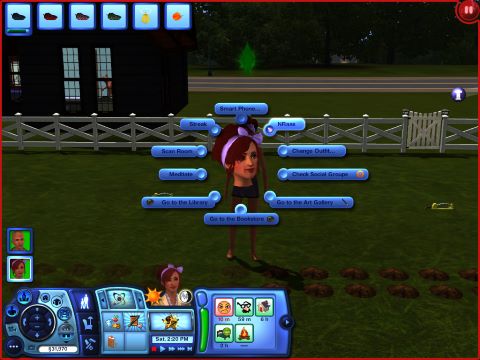
The NRAAS MasterController Mod is the best mod for complete control of your game. The MasterController Mod is a quick way to master how to edit sims in Sims 3 and experiment with different looks and personalities. You will be able to bring your sim back into create-a-sim with ease, as well as having a ton of other options to control your game. Once you have the mod installed in your game, simply click on your sim and select NRAAS. Follow the instructions below to get into create-a-sim:
NRAAS > MasterController > Advanced > Edit in CAS
Check out NRAAS MasterController Mod!
How to Change a Sim’s Appearance
If you are seeking to only change your sim’s appearance, there are many simple ways to accomplish this within the game. The game offers multiple ways to alter a sim’s hair and clothing without needing cheats or mods to be added or turned on.
Buy a Mirror or Dresser
Buying and placing a mirror on your sim lot will allow you to alter the sim’s look. Additionally, this will give you a more realistic look for your home and the ability to practice the charisma skill. Simply click on the mirror and select “Change Appearance”, which will bring your sim into create-a-sim where you will only be able to adjust their hairstyle and makeup.
To change a sim’s clothing, you will need to buy and place a dresser on your lot. The dresser is an essential item if you want the ability to plan new outfits and alter the sim’s current clothing. Once this item is placed, you will be able to click on it and select “Plan Outfit”. This will open create-a-sim and allow you to go through all of the clothing settings once again.
Salon and Tattoo Parlor
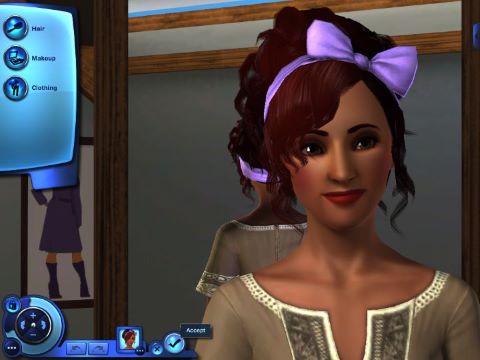
Another easy option for how to edit sims in Sims 3 is to head on over to the Salon and Tattoo Parlor in your town. You will need to physically go inside with your sim to get this option. Go over to the makeover station inside the location and select “Makeover Self”. This will bring your sim into create-a-sim where you will be able to adjust hair, makeup, and clothing. This is a free way to completely alter many different settings. Alternatively, you can opt to purchase a makeover station for your own house, although this will cost you simoleons and take up quite a bit of space.
Get Plastic Surgery at the Hospital

The Sims 3 Pet expansion brought in the ability to have plastic surgery done to alter a sim’s appearance. This may be needed if your sim is born or ages up looking differently than you expected them to. The hospital offers differently priced plastic surgery packages depending on if you want to alter their face or body and what you are willing to pay. There are two types of plastic surgery, facial beautification and body modification. Each offers two price options, cheap and expensive. Both cheap and expensive options will allow you to adjust the same settings. However, there is a 40% chance that the cheap plastic surgery package will fail and your sim will be given a randomized appearance, often resulting in a terrible look. A botched plastic surgery will open up the option for you to pay for corrective surgery to fix the mistake.
If the plastic surgery is successful, you will be able to alter the settings to your preferences. The facial beautification selections will allow you to alter all facial settings. You will be able to adjust the sim’s ears, eyes, mouth, and topical details (freckles and beauty marks). The body modification plastic surgery selections will allow you to alter the sim’s body modifier settings. These settings are only the body weight, muscle size, and muscle definition sliders.